29. When something goes wrong#
Messages#
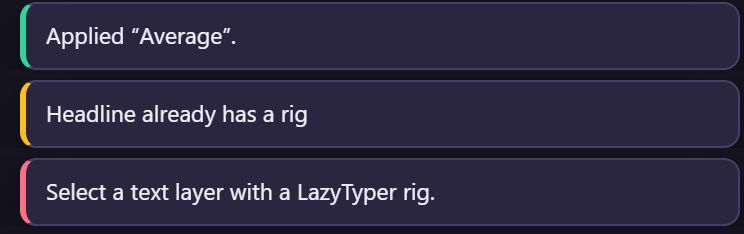
Every message the panel can show, what it means and what to do. Red toasts are errors (nothing was changed), amber ones are warnings (the rest was done).
| Message | Why | What to do |
|---|---|---|
| Open a composition first. | no composition is active | open the comp in the Timeline or the Comp panel |
| Select a text layer first. | Create was clicked without a text layer selected | select one or more text layers |
| Select a text layer with a LazyTyper rig. | the action needs a rig and none of the selected layers has one | select a rigged text layer (or its cursor or guide) |
| Select a text layer whose rig has a cursor. | applying or saving a cursor preset on a rig without a cursor | Add cursor first (chapter 12) |
| Select a text layer with a LazyTyper rig and no cursor. | Add cursor on a rig that already has one | nothing to do; or delete its cursor layer first |
| ‹layer› already has a rig | Create on a rigged layer (skipped) | Remove it first, or change it with the other cards |
| ‹layer› has its own Source Text expression | a Dynamic rig needs Source Text for itself (skipped) | make a Stable rig, or take your expression off |
| ‹layer› is already baked | Bake on a baked rig among others (skipped) | nothing to do; Shift+click to unbake |
| ‹layer› is baked: Refresh would bake it again | the panel did not know the rig was baked when Refresh was clicked (skipped) | click Refresh again and answer the question in the Rig card (chapter 9) |
| ‹layer› shows its first font size and colour as a Dynamic rig … | a Stable rig with mixed styles was switched to Dynamic (done; amber) | nothing, or Shift+click Refresh again to switch back |
| After Effects could not outline "‹layer›". | a Stable rig measures the text with Create Shapes from Text, and it failed | check that the layer has visible text at the time indicator, then try again; or use Dynamic |
| ‹layer›: ‹an expression error› | an expression reported an error right after it was written | Refresh; if it stays, see "Expressions" below |
| Give the preset a name. | Save with an empty name | type a name |
| Could not save presets.json: … | the presets file could not be written | check that %APPDATA%\LazyTyper (macOS: ~/Library/Application Support/LazyTyper) is writable |
| After Effects did not answer. Close and reopen the panel. | the panel's link to After Effects was lost | close the panel and open it again from Window › Extensions; restart After Effects if it stays |
| Nothing to rig. | Create found nothing to do | select text layers |
Problems#
The text does not type at all#
- Typing is off at the start (a Typing keyframe, chapter 13), or the layer starts later than you think: typing never runs before the layer's in point.
- Start at Character is as long as the text: everything shows from the first frame.
- The rig is baked (the status line says baked): the controls no longer change anything. Shift+click Bake to unbake (chapter 10).
- A Pause marker covers the time (chapter 7).
The cursor is in the wrong place#
- The font, size, tracking, alignment or box changed after the rig was made: click Refresh (chapter 9). For a Stable rig, also after changing the text.
- An offset is set on the cursor layer (chapter 27).
- The cursor or the guide was re-parented by hand: the cursor finds its text through its parent (chapter 22). Undo that, or Remove the rig and make it again.
A copied rig's cursor stays on the original line#
- The rig was made before LazyTyper 1.3: its cursor follows the original through its Text Layer control. Delete the copy, select the original, click Refresh once, and copy it again.
- A Dynamic rig was copied without its guide (it is shy, so Hide Shy Layers may hide it): delete the copied cursor, select the copied text and click Add cursor (chapter 22).
The cursor's colour does not change#
- Use Text Color is on, so Cursor Color is not used: switch it off (chapter 23).
- The text's colours changed and the cursor takes them: click the amber status line to refresh.
The cursor is gone#
- Show Cursor is off, or keyframed off at this time (chapter 23), or Cursor Opacity is 0.
A preset types slower or faster than it says#
- The comp's frame rate changed after rigging: the rig's Frames Per Character counts frames. Apply the preset again; it converts to the comp's frame rate (chapter 5).
- A value typed into Frames Per Character by hand is not converted: 3 frames is slower at 24 fps than at 60.
- Long texts with many line breaks or sentence ends type below the preset's characters a second: the panel measures on the selected text, so look at the line under the preset with the layer selected.
A rig from an earlier version has fewer controls#
A rig made with LazyTyper 1.2.0 or earlier has no Slow: Last Character, Slow: Before Line Break, Slow: Same Finger, Fast: Capitals in a Row, Fast: Numbers in a Row or Slow/Fast: Empty Lines. It keeps typing exactly as it did. Refresh (or Bake, or Unbake) adds them in their places, at values that change nothing; set them afterwards, or apply a preset.
The status line looks old#
The panel only asks After Effects about the selection while the pointer is over the panel, when the panel gets focus, and after its own actions. Move the pointer over the panel.
It plays slowly#
Long texts are heavier in the Legacy ExtendScript engine: switch the project to JavaScript (File › Project Settings › Expressions), or Bake the rig, which makes it instant in either engine.
Erase or Start typing does nothing#
The rig is baked: unbake, change, bake again (chapter 10).
Keystrokes I moved by hand went back#
Refresh on a baked rig bakes it again from its controls (the panel asks first, chapter 9). Undo (Ctrl+Z) brings the moved keys back.
Expressions#
Every expression the rig writes starts with // LazyTyper and its version. If one shows an error
after you changed something by hand (renamed a control, deleted the guide), select the rig and click
Refresh: it writes them all again and adds any missing control. Renaming the rig's controls breaks
the expressions, which find them by name.
The panel opens blank, or is missing#
See chapter 1: Fix a blank panel.bat, and restart After Effects after installing.
Still stuck?#
Write to lettertosohan@gmail.com with your After Effects version, the message, and what you clicked.
 আমি