LazyTyper#
Natural typing animation for After Effects, in one click. Select a text layer, press Create Typing Rig, and it types on like a person would: faster through common words, slower on capitals and symbols, a breath after a comma, a longer one after a full stop, with a blinking cursor that follows the text. Version 1.3 · free · MIT licence · one of Raisul Sohan's Lazy tools.
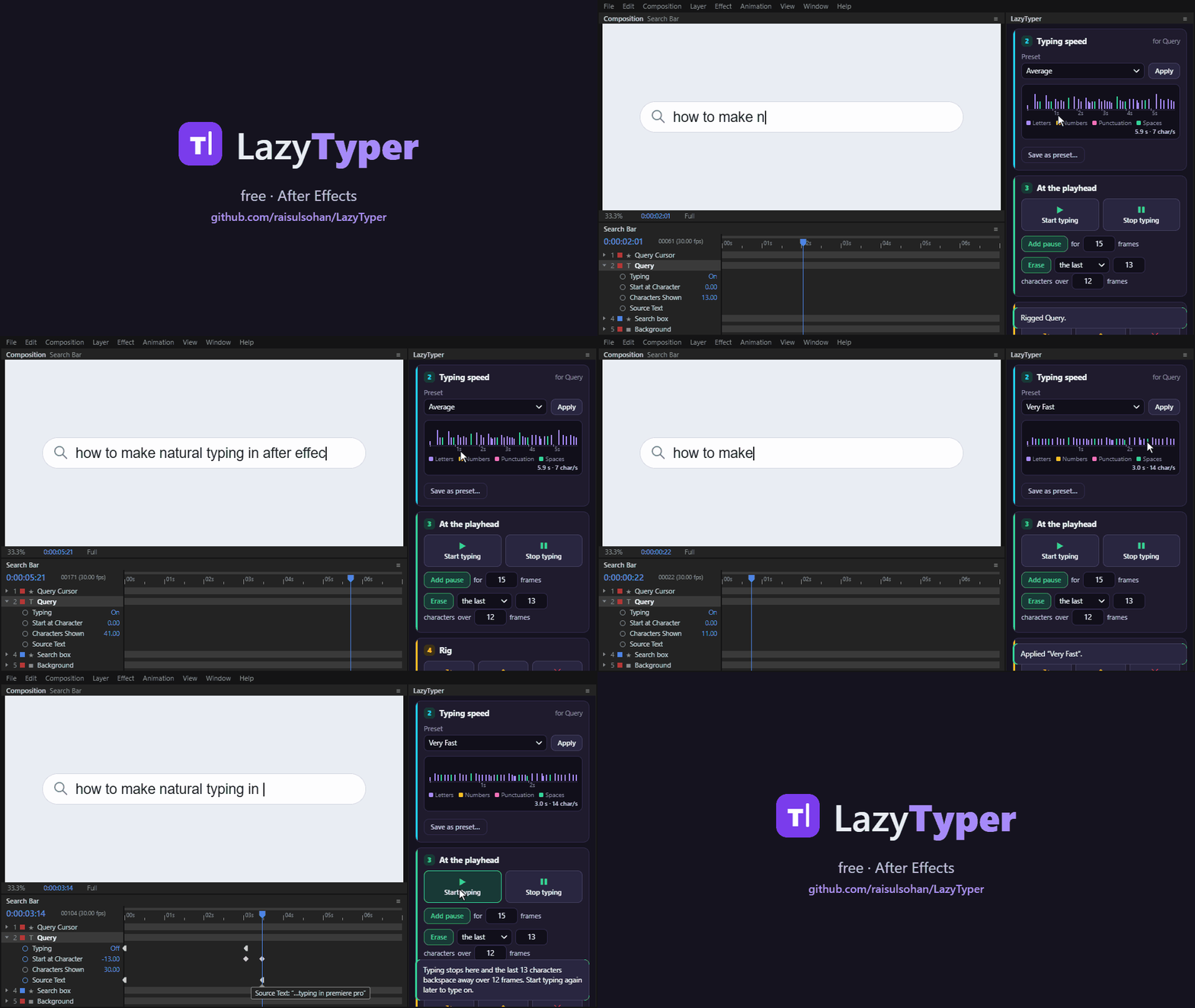
The same animation with a player (pause, frame by frame, typing sounds): docs/demo/lazytyper-demo.html, download it and open it in a browser.
The manual, a tutorial for every option with pictures and animations from After Effects: docs/manual.
Other typing rigs give every character the same time, which looks robotic. LazyTyper sets a base speed and lets each character's neighbours speed it up or slow it down, so the rhythm stays natural, and it stays natural when you change the text.
What it does#
- One-click typing rig on any text layer, point or paragraph text, several layers at once.
- Base speed as Frames Per Character or as a Total Duration for the whole text.
- Variance: how often a key comes late, repeatable through a random seed.
- Slow down controls: capitals, numbers, symbols, punctuation, after punctuation, sentence ends, the last character (a closing "!" with a beat), before and after a line break, word starts, long words, hard-to-reach letters, two letters typed by the same finger.
- Speed up controls: repeated letters (or slow them down), capitals and digits after the first in a row ("NASA", "2026"), common letter pairs, common words, momentum inside a word.
- Slow down or speed up controls: spaces, empty lines, letters typed with the same hand, fatigue over the text.
- Three typing presets (Very Fast, Average, Hunt & Peck) and your own, saved from any rig. A preset types as many characters a second at any frame rate (24, 25, 30, 50, 60 fps…), and the panel shows how many.
- Every control can be keyframed: change speed mid-sentence, stop, delete, type again.
- Pauses where you want them: a Pause layer marker; drag its end to set the length.
- Erase everything or the last few characters, backspace by backspace, then retype.
- Two rig types: Dynamic (re-wraps and re-centres as it types) and Stable (keeps mixed fonts and colours).
- Bake to keyframes coloured by what is typed (letters, numbers, punctuation, spaces, deleting) and nudge any keystroke by hand. Shift+click to unbake.
- A real cursor layer: the text's colour or your own, on and off, blink rate and softness, solid while typing, width that grows to the right, top and bottom set separately, all four corners rounded together or one by one, offsets in pixels or in % of the font size. With mixed font sizes it takes the size (and colour) of the character before or after it, and you choose whether its height and width grow. Presets: Vertical, Underscore, Box, and your own.
- Switch a rig between Dynamic and Stable with Shift+click Refresh, keeping every setting.
- Copy a whole rig (text, cursor, guide) with Duplicate or copy and paste, into the same comp or another: the copy is a rig of its own.
- Works with both expression engines (JavaScript and Legacy ExtendScript); everything is plain expressions, so a rig keeps working without the panel.
Install#
- Download
LazyTyper-v1.3.zipfrom the releases page and unzip it. - Close After Effects.
- Windows: double-click Install LazyTyper.bat. macOS: double-click Install LazyTyper (macOS).command.
- Start After Effects and open Window › Extensions › LazyTyper.
The panel is signed: no extension manager, no debug switch. Read me first.txt in the download has the details and what to do if the panel opens blank.
Quick start#
- Select one or more text layers.
- In 1 · Create rig choose Dynamic or Stable, a typing style and a cursor.
- Click Create Typing Rig and press play.
| Dynamic | Stable | |
|---|---|---|
| Paragraph text wraps word by word as it types | yes | no (layout fixed) |
| Centred or right-aligned lines re-centre as they grow | yes | no |
| Mixed fonts, sizes and colours | no (first style) | yes |
| Extra layers | cursor + hidden guide | cursor |
| Change the text | nothing to do | click Refresh |
| Change font, size, tracking or the box | click Refresh | click Refresh |
The controls#
On the text layer (Effect Controls):
| Control | What it does |
|---|---|
| Typing | Typing runs while this is on. Each time it switches on, the first character comes at once. |
| Start at Character | Characters already showing when typing starts. Lower it while Typing is off to delete. |
| Speed Mode | Frames Per Character or Total Duration. |
| Frames Per Character / Total Duration | The base speed. |
| Variance, Random Seed | How likely a key comes late (by 25-150 %), and which keys. |
| Slow: … | 100 % makes those characters take twice as long. |
| Slow: Last Character | Waits before the text's last character (not counting spaces and line breaks after it). |
| Slow: Before Line Break, Slow: New Line | The wait before Return is pressed, and the wait after it. |
| Slow: Same Finger | Two letters in a row on different keys typed by the same finger (QWERTY touch typing: ed, un, lo). |
| Fast: … | 100 % makes those characters twice as fast. |
| Fast: Repeated Letters | Also below 0: then a double letter slows down (a fast typist's stumble). |
| Fast: Capitals in a Row, Fast: Numbers in a Row | The keys after the first in a row ("NASA", "2026") lose this share of Slow: Capitals or Slow: Numbers; at 100 % they type like small letters. |
| Slow/Fast: … | Positive slows down, negative speeds up. |
| Slow/Fast: Empty Lines | Each extra Return in a row, on top of Slow: New Line. |
| Characters Shown | The result. Bake turns it into keyframes. |
Matching a typist: a fast typist has a quick base speed, low variance, a few slow-downs and some speed-ups; a slow typist the opposite.
On the cursor layer (it is parented to its text, or for a Dynamic rig to the guide, which is parented to the text; that is how it finds them):
| Control | What it does |
|---|---|
| Show Cursor | Off hides the cursor, whatever its opacity. Keyframe it to show it only some of the time. |
| Use Text Color | On: the text's fill colour (Stable: the colour of the character the size comes from). Off: Cursor Color. |
| Cursor Color, Cursor Opacity | The colour when Use Text Color is off; how solid it is. |
| Blink, Blinks per Second, Blink While Typing, Blink Softness | Blinking; while typing it stays solid unless Blink While Typing is on. |
| Width, Top, Bottom | % of the font size: the width growing to the right, the top above the baseline, the bottom below. |
| Size From | Character Before or Character After: whose font size it takes when sizes are mixed (Stable). |
| Height Follows Size, Width Follows Size | Off: that dimension keeps the text's main size beside a bigger or smaller character. |
| Roundness, Individual Corners, Top Left … Bottom Left | Rounded corners, all four or one by one. |
| Offset Unit, X Offset, Y Offset | Moves the cursor, in Pixels or in % of Font Size (X like the width, Y like the height). |
The panel#
- Typing speed: apply a preset to the selected rigs, see the rhythm it gives the selected text and how many characters a second, save a rig's settings as your own preset (it keeps the comp's frame rate, and is converted for comps at other rates).
- At the playhead: Start typing, Stop typing, Add pause, Erase (everything or the last N characters over N frames).
- Rig: Refresh (Shift+click: switch between Dynamic and Stable), Bake (Shift+click: unbake), Remove (the cursor and guide go too). When the font, size, layout, (Stable) text or, for a cursor in the text's colour, the colours changed since the cursor was measured, the top of the panel turns amber and says so; click it to refresh. Refresh on a baked rig bakes it again from its controls; the panel asks first, because keystrokes moved by hand go back.
- Cursor: apply or save cursor presets, add a cursor to a rig that has none.
- Settings: the label colours baked keyframes get.
Delete and retype: Stop typing, Erase, keyframe the new Source Text, Start typing.
Good to know#
- Long texts: the JavaScript expression engine (File › Project Settings › Expressions) is several times faster than Legacy ExtendScript; baking makes any rig instant.
- A rig is made of ordinary expression controls, a text animator and expressions. Sending a project to someone without LazyTyper is fine.
- A rig made with an earlier version keeps typing and looking exactly as it did. Refresh gives it the newer controls, at values that change nothing until you set them.
- To copy a rig, select its text, cursor and guide layers (the guide is shy: switch off Hide Shy Layers to see it) and Duplicate, or copy and paste into any comp. A rig made before 1.3 needs one Refresh first.
Building from source#
See docs/development.md: how it works, the tests (Node and inside After Effects) and how a release is built.
Licence#
MIT, see LICENSE. lib/CSInterface.js is Adobe's, under its own licence.
 আমি