27. Offset Unit, X Offset and Y Offset#
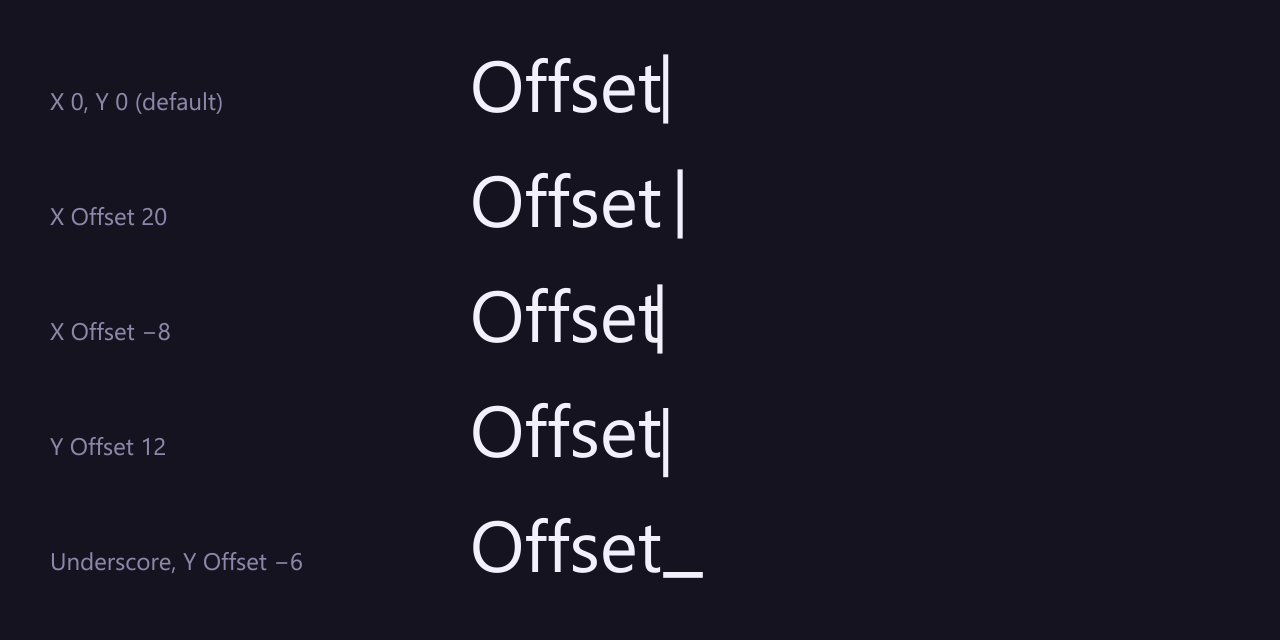
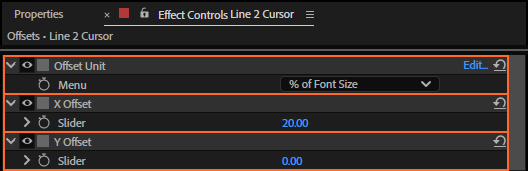
X Offset and Y Offset move the cursor from where the rig puts it: for a little more air after the letters, or an underscore that sits lower. Offset Unit says what they count in: % of Font Size, so the offset grows with the text, or Pixels.
Where to find them#
What each does#
| Control | Default | What it does |
|---|---|---|
| Offset Unit | % of Font Size | % of Font Size: the offsets are shares of the font size, like Width, Top and Bottom. Pixels: pixels of the text layer. |
| X Offset | 0 | To the right (negative: to the left). |
| Y Offset | 0 | Down (negative: up). |
At 72 px in % of Font Size, X Offset 10 is about 7 px. With mixed font sizes (chapter 25), X Offset counts in the size Width uses and Y Offset in the size Top and Bottom use, so an underscore moved down by 10 % moves further beside a big word.
The rig already leaves a small gap after each character (a little air, so the cursor never touches a glyph). The offsets are added on top, in the text layer's own space: when the text layer is scaled, the offsets scale with it.
Tips and pitfalls#
- Offsets in % of Font Size keep fitting after a change of font size; in pixels, check them.
- For a cursor that is too tall or too low, Top and Bottom (chapter 25) are usually the better fix.
- Offsets and Offset Unit are part of cursor presets (chapter 12).
- Rigs and cursor presets made before LazyTyper 1.3 keep their offsets in pixels: Refresh adds Offset Unit set to Pixels. Switch it to % of Font Size and type the offsets again to make them grow with the text.
 আমি