How Auto Box works#
Auto Box is the only tool here that keeps working after you click the button: the box measures the text on every frame and resizes itself. This page is what it builds, why it is built that way, what it costs, and where it gives up. For the controls themselves, see the manual.
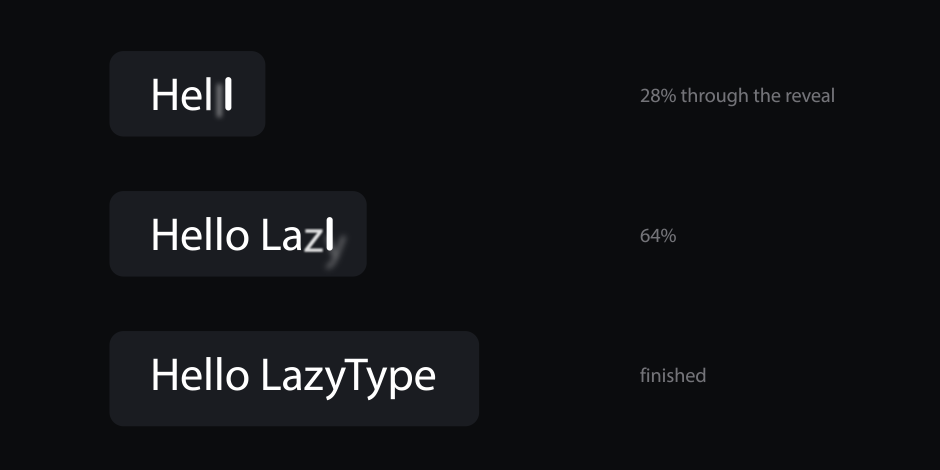
One box, three points of the same reveal. The box follows the measured width, the caret rides the typing edge, and the characters just behind it are still settling.
Contents
- What it builds
- Why there is a second, invisible text layer
- The effect controls it adds
- The six styles
- What it costs
- Other scripts and other languages
- Where it gives up
What it builds#
For one text layer called Headline, Auto Box produces three things:
Headline                    ← your text layer, with controls and animators added
Headline - Box              ← the shape layer, parented to the text
Headline - Box Measure      ← a hidden guide layer, parented to the text
On your text layer it adds two slider controls, LazyType Reveal (0→100,
keyframed over the reveal) and LazyType Band, and two text animators,
LazyType Hide and LazyType Settle. Hide keeps everything past the caret
invisible; Settle gives the few characters at the caret their blur, rise,
scale or fade as they land.
The box is a shape layer with two groups: Caret on top and Auto Box
below it. Its anchor and position are zero and it is parented to the text, so
it lives in the text layer's own coordinates — move, scale or rotate the text
and the box comes with it for free.
The measure layer is a duplicate of your text with every animator and effect stripped, opacity zero, marked as a guide layer, shy, and with motion blur off. It never renders. Its only job is to be measured.
Why there is a second, invisible text layer#
The obvious approach is to measure the text layer itself with
sourceRectAtTime and size the box to that. It does not work, and the reason
is worth knowing before you try to simplify the rig:
A text layer's
sourceRectAtTimedoes not shrink while the text types on. Opacity does not change it and neither does blur. As far as After Effects is concerned the layer is always its full width, even when every character past the third is invisible.
So the box would snap to its final size on frame one and never move.
The measure layer solves it by holding a different string. Its Source Text is an expression that reads the reveal slider and cuts your text to that many characters, words or lines:
var T = null; try { T = thisLayer.parent; } catch (e) { T = null; }
if (T == null) { value; } else {
    var s = T.text.sourceText.value;
    var p = T.effect("LazyType Reveal")("Slider") / 100;
    ...
    s.substr(0, Math.round(n * p));
}
Measuring that layer gives a width that really does grow as the text
appears. Two Point Controls on the box hold the result — Box Rect for the
size and Box Center for where it sits — and every other property on the box
reads those two instead of measuring again.
That try around thisLayer.parent is not decoration. After Effects
permanently disables an expression that throws, and a bare thisLayer.parent
throws the moment the layer has no parent. Delete the text layer, undo, and
the box would be dead for good with no way back but rebuilding it. Read inside
a try, and the box simply measures nothing and fades out.
The effect controls it adds#
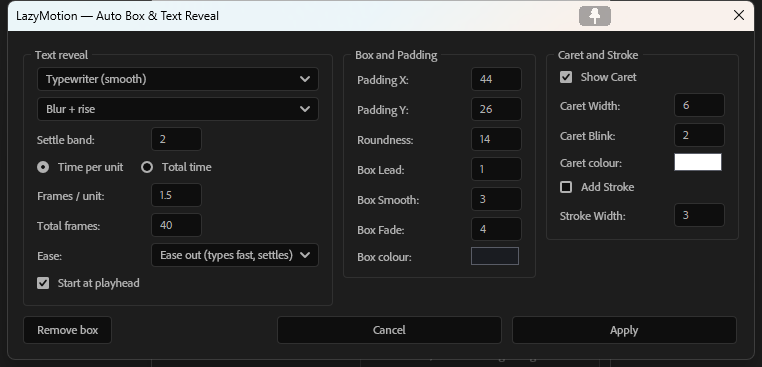
All of these live on the box layer, so you can adjust the look after the fact without reopening the dialog:
| Control | What it changes |
|---|---|
Padding X, Padding Y
|
Space around the text. |
Roundness |
Corner radius, clamped to half the box height. |
Box Opacity |
Scales the whole box's opacity. |
Box Color |
Fill colour. |
Box Lead |
Frames the box runs ahead of the text. |
Box Smooth |
Frames averaged when measuring. See What it costs. |
Box Fade |
Frames the box takes to fade in at the start. |
Caret |
Checkbox: show the caret or not. |
Caret Width, Caret Gap, Caret Blink, Caret Color
|
The caret. |
Box Rect, Box Center
|
The measurements. Read-only in practice — they are driven by expressions; changing them by hand does nothing. |
The box's opacity also inherits the text layer's own opacity, so fading your text fades the box with it.
The six styles#
| Style | Unit | What the animators do |
|---|---|---|
| Typewriter (smooth) | characters | Hide + Settle, with a soft band at the caret. |
| Typewriter (hard) | characters | Hide only — characters snap on, no settle. |
| Word by word | words | Hide + Settle, one word at a time. |
| Line by line | lines | Hide + Settle, one line at a time. |
| Box only (I animate Reveal) | characters | Builds the whole rig but adds no animators. The LazyType Reveal slider is yours to key however you like. |
| Static box (no reveal) | — | A box that fits the text. No reveal, no measure layer, no animators. |
Static box is the cheapest by a wide margin, because with no measure layer
there is nothing to re-measure per frame.
What it costs#
sourceRectAtTime is expensive, and this rig calls it on every frame. These
are real numbers from After Effects 2026 on the machine this was built on,
measured by tools/ae-autobox-perf.jsx over a
100-frame sweep with all 11 of the box's expressions evaluating:
| Situation | Cost |
|---|---|
| 1 box, defaults | 5.96 ms per frame |
| 10 boxes, defaults | 6.60 ms per box — about 66 ms a frame in total |
| 1 box on a 600-character paragraph | 10.8 ms per frame |
Box Smooth 0 / 3 / 10 / 20 |
2.73 / 6.46 / 13.1 / 22.5 ms per frame |
Two things follow from that table.
Box Smooth is a straight multiplier. Every step is another measurement.
The default of 3 is the point where the box stops stepping character by
character and starts sliding; past about 10 you are paying a lot for very
little.
Long text turns its own smoothing down. Past about 160 characters the slider is built at 1, and past 400 at 0. A big block of text moves slowly enough that the smoothing was buying nothing, and it is the case where each measurement costs the most. You can raise it again on the box layer if you want to.
Version 1.9 took about a third off this. Box Rect and Box Center used to
run the whole smoothing loop each, so the text was measured twice over — eight
sourceRectAtTime calls a frame at the defaults. Only the size needs
smoothing (the left and top edges barely move while text types on), so the
centre now measures once and reads the smoothed size off Box Rect. Same box,
same look: 939 ms down to 657 ms over 100 frames.
If a comp with many boxes gets sluggish, in order of effect: turn Box Smooth
down, use Static box on the ones that do not need to type on, or precompose
finished title cards.
Other scripts and other languages#
The measure layer cuts the string with substr, which counts UTF-16 code
units, not what a reader would call a letter. That is a real worry for
scripts where one visible cluster is several code points — Bengali ক্ষ is
three (ক + ্ + ষ), and a vowel sign follows its consonant rather than standing
alone. Cutting inside a cluster can render a broken glyph that is wider than
the finished one, which would make the box jump backwards.
This was measured rather than assumed, by
tools/ae-autobox-unicode.jsx, which types
Bengali on and watches the measure layer's width at twenty points across the
reveal. It holds up: the width only ever climbs, never overshoots the
finished width, and never steps backwards. The growth is chunkier than Latin —
a cluster appears all at once — but that is the script, not the rig.
The same should hold for other Indic scripts, Arabic and emoji, though only Bengali has been measured. If you see a box jump on a script not listed here, that is worth reporting.
Where it gives up#
- Deleting the text layer leaves the box and the measure layer behind. After Effects orphans children rather than deleting them. The orphaned box throws no errors — it measures nothing and fades out — but it is still a layer in your comp. Use Remove box instead, or delete all three.
- Two text layers with the same name in one comp will confuse the rig, because the box finds its measure layer by the parent's name. Rename one.
- A caret cannot sit at the end of wrapped multi-line text, so it hides itself when the text is more than about one line and a half tall.
- Per-character 3D text is not supported; the rig assumes the text layer's own coordinate space.
- If the box cannot be parented to the text for any reason, it is removed and reported rather than left in the comp silently measuring nothing.
